How to Create High-Converting Google Ads Headlines and Descriptions
Running Google Ads is easy. Creating ads that actually generate clicks, leads, and sales is where strategy matters.
GOOGLE ADS
6/20/20263 min read
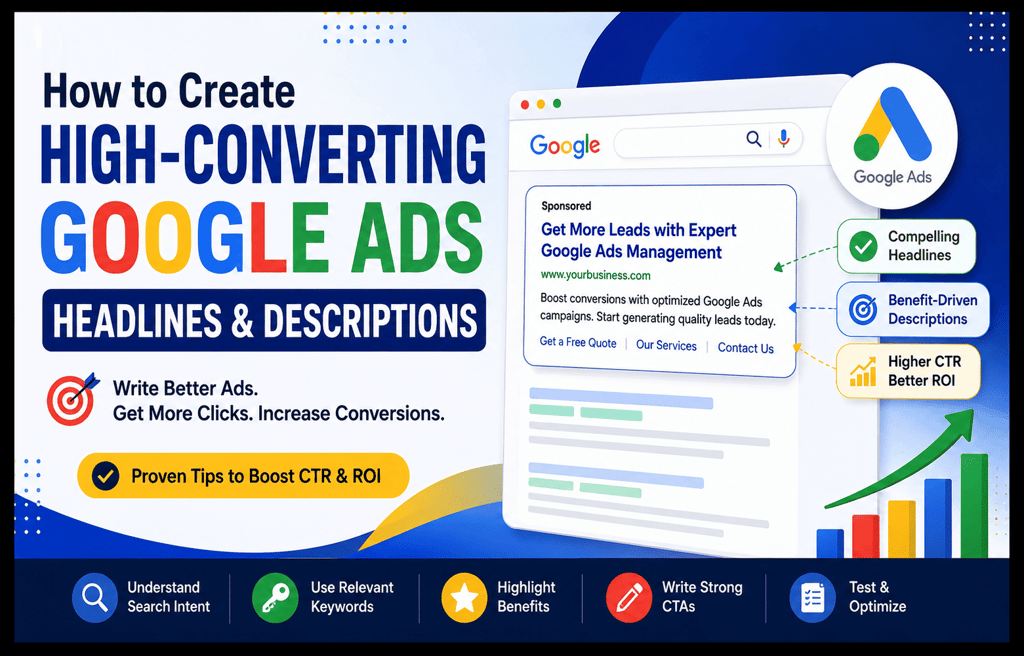
Running Google Ads is easy. Creating ads that actually generate clicks, leads, and sales is where strategy matters. Your headlines and descriptions are the first things potential customers notice in search results, and they directly impact your Click-Through Rate (CTR), Quality Score, and conversions.
If your ad copy is weak, even a high budget may not deliver results. Here’s how to create high-converting Google Ads headlines and descriptions that attract attention and drive action.
1. Understand User Search Intent
Before writing ad copy, understand what users are searching for. Are they looking for information, comparing options, or ready to buy?
Your headlines and descriptions should match the user’s intent.
Examples:
Search: “SEO services near me” → Focus on local trust and quick action.
Search: “best Google Ads expert” → Highlight expertise and results.
When ads match intent, users are more likely to click and convert.
2. Include Primary Keywords Naturally
Adding relevant keywords improves ad relevance and helps users instantly recognize that your ad matches their search.
Important keywords to include:
Google Ads Headlines
Google Ads Descriptions
High-Converting Google Ads
PPC Advertising
Google Search Ads
Increase CTR
Google Ads Optimization
Digital Marketing Services
Google Ads Campaign
Example Headline:
Get More Leads with Expert Google Ads Management
Example Description:
Boost conversions with optimized Google Ads campaigns. Start generating quality leads today.
3. Highlight Benefits Instead of Features
Users care more about outcomes than technical details.
Weak:
“Professional Google Ads Services”
Stronger:
“Get More Qualified Leads and Improve ROI”
Show users what they gain:
More leads
Higher conversions
Better ROI
Faster business growth
Lower cost per click
4. Add Numbers and Strong Action Words
Numbers make ads more believable and eye-catching.
Examples:
Increase Sales by 40%
Free Consultation
Get Results Faster
Starting from $99
Use action-driven phrases:
Start Today
Get a Free Quote
Book Now
Contact Us
Learn More
5. Create Multiple Headlines and Descriptions
Google Ads performs better when multiple variations are added.
Recommended:
10–15 Headlines
3–4 Descriptions
Test different combinations to discover which messaging drives the best conversion rates.
6. Use Emotional Triggers and Trust Signals
Build confidence through credibility.
Examples:
Trusted by 500+ Clients
5-Star Rated Service
Certified Google Ads Expert
Proven Results
These elements improve click confidence and increase conversions.
Final Thoughts:
Creating high-converting Google Ads headlines and descriptions is not about using complicated words. It is about understanding your audience, using targeted keywords, highlighting benefits, and testing continuously.
Strong ad copy can improve CTR, lower advertising costs, and generate more leads from your Google Ads campaigns. Start optimizing your headlines and descriptions today and turn more clicks into customers.
Contact us to start the Google Ads – 10 Yrs of Experience
Frequently Asked Questions (FAQs):
1. What makes a Google Ads headline high-converting?
A high-converting Google Ads headline attracts attention, includes relevant keywords, addresses user intent, and encourages action. Strong headlines often highlight benefits, offers, trust signals, or solutions to customer problems.
2. How many headlines should I add in Google Ads?
Google recommends adding multiple headline variations for Responsive Search Ads. Ideally, use 10 to 15 headlines so Google can test combinations and find the best-performing ad copy.
3. What is the ideal length for Google Ads descriptions?
Each Google Ads description can contain up to 90 characters. Keep descriptions clear, benefit-focused, and include a strong call-to-action to improve click-through rates.
4. Should I include keywords in Google Ads headlines?
Yes. Including targeted keywords in headlines improves ad relevance, increases Quality Score, and helps users quickly identify that your ad matches their search query.
5. How can I improve my Google Ads click-through rate (CTR)?
You can improve CTR by writing compelling headlines, using action-oriented language, adding benefits, testing multiple ad variations, and aligning ad messaging with user intent.
6. What are common mistakes to avoid in Google Ads copy?
Common mistakes include keyword stuffing, writing generic headlines, ignoring user intent, using weak calls-to-action, and not testing different ad combinations.
7. Do descriptions affect Google Ads conversions?
Yes. Effective descriptions explain value, build trust, and motivate users to take action, which can increase conversions and reduce wasted ad spend.
8. What is a good call-to-action for Google Ads?
Popular calls-to-action include:
Get a Free Quote
Contact Us Today
Start Your Campaign
Book a Free Consultation
Learn More
Get Started Now
9. How often should I update Google Ads headlines and descriptions?
Review and optimize your ad copy every 2 to 4 weeks based on campaign performance, CTR, conversion rate, and search term data.
10. Can A/B testing improve Google Ads performance?
Yes. A/B testing different headlines and descriptions helps identify which messaging delivers better clicks, leads, and overall campaign performance.
Get in touch
Location
Odhav, Ahmedabad, 382415
Gujarat, India
© 2025. All rights reserved. Pro Digital Marketing Service