
Technical SEO Basics Every Website Owner Should Know
Technical SEO is the foundation of every successful website. Even the best content cannot rank well if search engines struggle to crawl, index, or understand your pages.
AI AEOAI GEODIGITAL MARKETINGSEOAI SEO
7/6/20263 min read
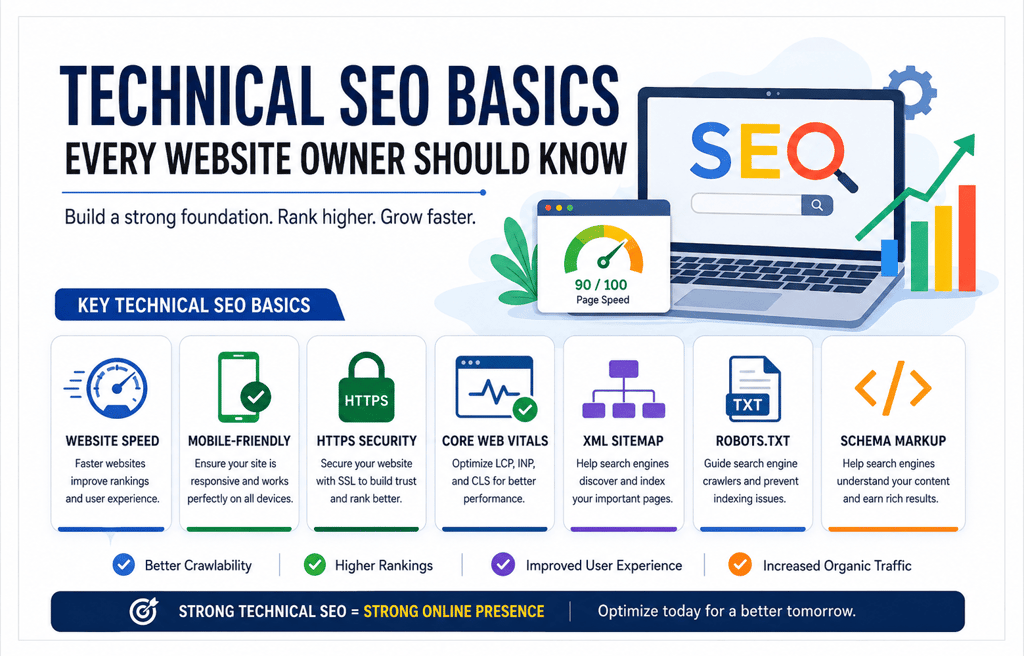
Technical SEO is the foundation of every successful website. Even the best content cannot rank well if search engines struggle to crawl, index, or understand your pages. Whether you own a business website, an eCommerce store, or a blog, implementing the right technical SEO practices helps improve search visibility, user experience, and long-term organic traffic.
Google continues to prioritize websites that are fast, secure, mobile-friendly, and technically optimized. If you're wondering How To Improve Google Rankings, increase organic traffic, or fix website SEO issues, mastering technical SEO is the first step.
What is Technical SEO?
Technical SEO refers to optimizing your website's infrastructure so search engines can efficiently crawl, index, and rank your content. Unlike on-page SEO, which focuses on content and keywords, technical SEO ensures your website performs well behind the scenes.
A technically Optimized Website Loads Faster, provides a better user experience, and allows Google to understand your pages more accurately.
Essential Technical SEO Basics
1. Improve Website Speed
A slow-loading website increases bounce rates and negatively impacts rankings. Compress images, enable browser caching, use a Content Delivery Network (CDN), and minimize CSS and JavaScript files to improve page speed.
2. Make Your Website Mobile-Friendly
Google uses mobile-first indexing, meaning it primarily evaluates the mobile version of your website. Ensure your website is responsive and works seamlessly across all devices.
3. Secure Your Website with HTTPS
An SSL certificate protects user data and builds trust. Google also considers HTTPS as a ranking signal.
4. Optimize Core Web Vitals
Core Web Vitals measure loading performance, interactivity, and visual stability. Improving metrics like Largest Contentful Paint (LCP), Interaction to Next Paint (INP), and Cumulative Layout Shift (CLS) enhances both SEO and user experience.
5. Submit an XML Sitemap
An XML sitemap helps Google discover your important pages quickly. Keep it updated and submit it through Google Search Console.
6. Check Robots.txt
Your robots.txt file tells search engines which pages they can crawl. Incorrect settings may accidentally block valuable pages from being indexed.
7. Fix Crawl Errors
Regularly monitor Google Search Console for crawl errors, broken links (404 errors), redirect chains, and server issues. Fixing these problems improves website health and indexing.
8. Use Structured Data (Schema Markup)
Schema Markup Helps Search Engines better understand your content and can increase your chances of earning rich results in Google Search.
Why Technical SEO Matters
Technical SEO creates a strong foundation for every other SEO strategy. A technically healthy website gets crawled more efficiently, indexes faster, delivers a better user experience, and is more likely to achieve higher rankings in Google Search and AI-powered search results.
Conclusion:
Technical SEO is not a one-time task but an ongoing process. Regular website audits, monitoring performance, and fixing technical issues can significantly improve your online visibility. By focusing on website speed, mobile optimization, Core Web Vitals, HTTPS, XML sitemaps, schema markup, and crawlability, you'll build a website that both users and search engines trust.
Frequently Asked Questions (FAQs)
1. What is Technical SEO?
Technical SEO is the process of optimizing a website's technical structure so search engines can crawl, index, and rank pages more effectively.
2. Why is Technical SEO important?
Technical SEO improves website performance, user experience, indexing, and search engine rankings, leading to increased organic traffic.
3. What are Core Web Vitals?
Core Web Vitals are Google's performance metrics that measure page loading speed, responsiveness, and visual stability.
4. How can I improve my website's technical SEO?
Improve page speed, optimize for mobile devices, fix broken links, use HTTPS, submit XML sitemaps, optimize Core Web Vitals, and implement schema markup.
5. What is an XML Sitemap?
An XML sitemap is a file that lists important pages on your website to help search engines discover and index them efficiently.
6. What is the purpose of robots.txt?
The robots.txt file tells search engine crawlers which pages or folders they should or should not access.
7. Does website speed affect SEO rankings?
Yes. Google considers page speed a ranking factor, and faster websites generally provide better user experiences and lower bounce rates.
8. What is mobile-first indexing?
Mobile-first indexing means Google primarily uses the mobile version of your website when determining search rankings.
9. How often should I perform a technical SEO audit?
It's recommended to perform a Technical SEO Audit every 1 to 3 months or after significant website updates.
10. Can Technical SEO improve AI search visibility?
Yes. A technically optimized website with structured data, fast loading speed, clear site architecture, and high-quality content is more likely to perform well in AI-powered search experiences as well as traditional organic search.
Get in touch
Location
Odhav, Ahmedabad, 382415
Gujarat, India
© 2025. All rights reserved. Pro Digital Marketing Service